What is WebGL Fingerprinting and How to Bypass It
In this article, I’ll explain what WebGL fingerprinting is in a simple way. I’ll also show how it works and why it’s so good at spotting bots. Most importantly, I’ll talk about some smart ways to get around it. If you’re into web scraping like I am, this guide will help you understand WebGL fingerprinting and how to deal with it better.
What is WebGL?
WebGL stands for Web Graphics Library. It is a JavaScript API used by browsers to render interactive 2D and 3D graphics without needing plugins. WebGL uses the computer’s Graphics Processing Unit (GPU) to perform rendering tasks.
Most modern browsers support WebGL. Websites use it for games, visual effects, image editing, and complex graphical interfaces. But aside from its useful applications, WebGL can also be used for something less visible: tracking users through fingerprinting.
What is WebGL Fingerprinting?
WebGL fingerprinting is a method of identifying and tracking users based on how their browser and GPU render a specific graphic scene using WebGL. Every computer has a unique combination of hardware (GPU), drivers, and software. These differences cause WebGL to produce slightly different outputs on different machines.
When a website uses WebGL fingerprinting, it asks the browser to draw a hidden image using WebGL. It then reads the resulting pixel data and configuration parameters. Because each system renders the image a bit differently, this data acts like a digital fingerprint.
Key Factors in WebGL Fingerprinting
The fingerprint created from WebGL can include:
- GPU model and vendor (e.g., NVIDIA, AMD, Intel)
- Driver versions
- Shader precision and rendering details
- Maximum texture size
- Supported extensions
- WebGL vendor and renderer strings
- The rendered image’s pixel data
- Canvas size and behavior
How WebGL Fingerprinting Works?
Let’s break down how this technique functions, step by step.
Creating a WebGL Context
The website loads a script that initializes a WebGL context in a hidden HTML <canvas> element. This context is the environment for rendering graphics.
Collecting WebGL Parameters
Next, the script collects technical data from the rendering process:
- getParameter calls return values like maximum texture size
- getSupportedExtensions reveals available WebGL features
- GPU vendor and renderer information is gathered using UNMASKED_RENDERER_WEBGL
Reading the Image Output
After the scene is rendered, the script reads pixel values using readPixels. These pixel differences are small but consistent for each system.
Hashing the Fingerprint
The collected parameters and pixel data are combined and hashed into a single value. This fingerprint is then sent to the server.
Identifying the Device
The server stores this fingerprint and checks it against a database. If it matches a known bot or suspicious pattern, the request may be blocked or challenged with a CAPTCHA.
Why is WebGL Fingerprinting So Difficult to Bypass?
Unlike software-level fingerprints (like user-agent or screen resolution), WebGL fingerprints rely on hardware-level traits. These include GPU behavior, driver versions, and rendering outputs. These elements are much harder to spoof because they come directly from the machine’s physical hardware.
Even if you fake some values using scripts or browser extensions, the actual rendered output will often expose inconsistencies. That’s why WebGL fingerprinting is one of the most effective ways to identify bots.
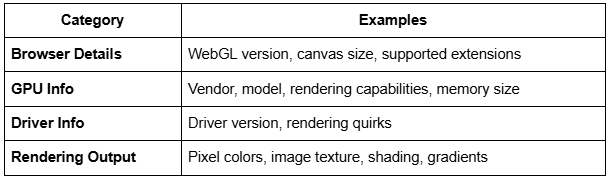
Information Collected Through WebGL Fingerprinting
Here’s a summary of the kinds of data collected:
How to Bypass WebGL Fingerprinting?
Bypassing WebGL fingerprinting is not easy, but there are methods that can help. Let’s explore both manual and automated solutions.
Use Headless Browsers with Spoofing
Popular tools like Selenium and Playwright can control browsers automatically. However, by default, they do not spoof hardware-based fingerprinting.
Some projects have tried to extend these tools:
- Undetected ChromeDriver (for Selenium): Bypasses basic bot checks
- Puppeteer Stealth Plugin: Hides signs of automation
- Playwright Stealth: A growing community project
These tools can help spoof user-agent, screen size, and other common traits, but spoofing WebGL is trickier. You may still get blocked if the rendered image doesn’t match the fake parameters.
Use Browser Extensions to Modify WebGL
Some browser extensions attempt to spoof WebGL properties:
These extensions intercept WebGL API calls and return altered data. However, they often fail to spoof actual rendering outputs, which still differ at the pixel level.
Advanced websites can detect that spoofing is happening and flag the request as suspicious.
GPU Virtualization
One advanced technique is to use virtualized environments with similar GPU configurations. For example, running your scraper inside containers that share a common GPU profile.
Virtual machines or containers using NVIDIA GRID or similar technology can create multiple instances with identical rendering behavior.
However, this method is:
-
- Expensive
- Technically complex
- Difficult to scale
Request Static APIs When Possible
If you’re scraping public data, check if the website provides a public or hidden API that returns JSON instead of requiring rendering. API endpoints are often less protected than pages requiring WebGL rendering. Of course, this doesn’t work for all use cases — especially on protected or dynamic sites.
Use Professional Scraping Networks
The most reliable way to bypass WebGL fingerprinting is to use a premium scraping solution. One popular provider is Bright Data. Want to see other providers? Check out my list of the best web scraping tools.
Bright Data offers:
- Browser automation at scale
- Residential, mobile, and datacenter IPs
- GPU rendering environments
- Automatic fingerprint management
- Web Unlocker service that bypasses bot detection
Bright Data’s infrastructure rotates between thousands of browsers with realistic fingerprints. It handles browser behavior, rendering quirks, and request headers automatically, so you don’t have to worry about fingerprint mismatches.
This is ideal for companies that need large-scale, high-success scraping without manually spoofing WebGL.
Sample Code Using Bright Data’s Scraper
Here’s how you might use Bright Data’s Web Unlocker to scrape a protected site:
# pip install requests
import requests
url = "https://example.com/protected"
headers = {
"Authorization": "Bearer ",
"Content-Type": "application/json",
}
data = {
"url": url,
"render": True,
"proxy_type": "residential"
}
response = requests.post("https://brightdata.com/api/scrape", json=data, headers=headers)
print(response.text)
Conclusion
WebGL fingerprinting is a powerful tool for detecting and blocking bots. It collects unique data from the user’s GPU and browser, making traditional bot detection methods like changing user-agent strings or IP addresses ineffective. Understanding how WebGL fingerprinting works can help when dealing with web scraping challenges.
There are various ways to bypass it, such as using browser extensions, headless browsers, or virtual environments. However, the most reliable approach for large-scale scraping is using professional scraping networks. These services handle fingerprinting, rotate IPs, and provide GPU rendering, improving the chances of bypassing detection.