Використання curl_cffi для вебскрапінгу в Python
У цій статті я познайомлю вас із curl_cffi та покажу, як він допомагає виконувати вебскрапінг сайтів без перешкод. Почнімо!
What is curl_cffi?
curl_cffi is a Python library that acts as a client for performing HTTP requests. It is built on top of cURL Impersonate, a fork of the popular cURL library. What makes curl_cffi unique is its ability to impersonate the TLS fingerprints of real web browsers. This allows it to bypass advanced bot detection techniques, such as TLS fingerprinting, which is a method used by websites to distinguish between real browsers and automated bots.
How Does curl_cffi Work?
curl_cffi works by impersonating real browsers during the TLS handshake process. Here’s a quick rundown of how the tool works:
- TLS Handshake: Під час виконання HTTPS-запиту між клієнтом і сервером відбувається TLS-рукостискання. Це рукостискання передбачає узгодження параметрів шифрування, а клієнт надсилає серверу свій відбиток, що допомагає серверу ідентифікувати клієнта.
- TLS Fingerprint Mimicking: Використання cURL Impersonate, curl_cffi alters the fingerprint to match that of a popular browser like Chrome or Safari. This helps hide the fact that the request is automated.
- HTTP/2 Handshake: curl_cffi also mimics browsers’ specific HTTP/2 handshake settings, providing further stealth.
- Customizable Configurations: Бібліотека дає змогу розробникам налаштовувати параметри TLS, як-от набори шифрів, підтримувані криві та заголовки, завдяки чому запити виглядають так, ніби їх надіслав реальний користувач.
🛡️ Додайте резидентські проксі для непомітності та масштабування
While curl_cffi helps you mimic real browsers, pairing it with Резидентські проксі Bright Data дає вам ще більше можливостей для вебскрапінгу. Ці проксі забезпечують ротацію IP-адрес реальних пристроїв, допомагаючи уникати блокувань і CAPTCHA — особливо під час вебскрапінгу сайтів на кшталт Walmart або виконання великомасштабних завдань. Це ідеальне поєднання для того, щоб залишатися непоміченим і виконувати вебскрапінг у великому масштабі.
Step-by-Step Guide to Using curl_cffi for Web Scraping
Let’s walk through a practical example of how to use curl_cffi for web scraping.
Крок 1: Налаштуйте свій проєкт
Почніть із налаштування Python-середовища. Це дасть змогу керувати залежностями й ізолювати ваш проєкт від інших Python-проєктів. Ось кроки для налаштування середовища:
Встановіть Python 3.x з офіційний вебсайт Python.
Створіть новий каталог для свого проєкту:
mkdir curl-cffi-scraper
cd curl-cffi-scraper
Створіть віртуальне середовище в каталозі проєкту:
python -m venv env
Активуйте віртуальне середовище:
On Windows:
envScriptsactivate
У macOS/Linux:
source env/bin/activate
Step 2: Install curl_cffi
Once your virtual environment is activated, you can install the curl_cffi library:
pip install curl-cffi
This will install curl_cffi along with the necessary cURL impersonation binaries.
Step 3: Import and Configure curl_cffi
Now that the library is installed, you can start writing your scraping script. First, create a Python file (e.g., scraper.py) and import the necessary modules:
from curl_cffi import requests
Тепер зробімо GET-запит до цільової вебсторінки. У цьому прикладі ми будемо збирати дані зі сторінки пошуку товарів Walmart за ключовим словом «keyboard». Ви можете використати параметр `impersonate`, щоб запит імітував певний браузер:
response = requests.get("https://www.walmart.com/search?q=keyboard", impersonate="chrome")
This tells curl_cffi to make the request appear as though it’s coming from the latest version of Google Chrome.
Крок 4: Витягніть дані зі сторінки
Після успішного отримання сторінки ви можете проаналізувати HTML-вміст. Для цього можна використати бібліотеку BeautifulSoup. Спочатку встановіть її за допомогою:
pip install beautifulsoup4
Тепер у скрипті розберіть вміст сторінки за допомогою BeautifulSoup:
from bs4 import BeautifulSoup
soup = BeautifulSoup(response.text, "html.parser")
Let's extract the title of the page:
title_element = soup.find("title")
title = title_element.text
print(title)
This will print the title of the page, such as “Electronics — Walmart.com”, if the scraping request was successful.
Крок 5: Запустіть вебскрапер
Тепер ви можете запустити вебскрапер, виконавши Python-скрипт:
python scraper.py
If everything works correctly, you will get the page title printed on your terminal. If you did not use the impersonate=”chrome” argument, Walmart would likely show a CAPTCHA or a bot detection page instead.
Advanced Features of curl_cffi
1. Browser Impersonation
curl_cffi supports several browser versions for impersonation. You can specify a browser version when making a request. Here are a few examples:
- Chrome: impersonate=”chrome”
- Edge: impersonate=”edge101″
- Safari: impersonate=”safari17_2_ios”
Це дає змогу точно відтворювати конкретні TLS-відбитки браузерів і уникати виявлення.
2. Session Management
curl_cffi allows you to maintain sessions across multiple requests. This is useful when a website requires authentication or when cookies are used. Here’s how you can create a session and use it for subsequent requests:
session = requests.Session()
session.get("https://httpbin.org/cookies/set/userId/5", impersonate="chrome")
print(session.cookies)
3. Proxy Support
To avoid getting blocked, you can use proxies. curl_cffi allows you to set proxies for both HTTP and HTTPS requests. Here’s an example:
proxies = {"http": "http://your_proxy", "https": "https://your_proxy"}
response = requests.get("https://www.example.com", impersonate="chrome", proxies=proxies)
Для більшості сценаріїв використання я раджу використовувати резидентські проксі. Ви можете переглянути мій список найкращі резидентські проксі щоб підібрати ідеального провайдера під ваші потреби.
4. Asynchronous Requests
For scraping multiple pages concurrently, curl_cffi supports asynchronous requests through AsyncSession:
from curl_cffi.requests import AsyncSession
import asyncio
async def fetch_data():
async with AsyncSession() as session:
response = await session.get("https://www.example.com", impersonate="chrome")
print(response.text)
asyncio.run(fetch_data())
Comparing curl_cffi with Other HTTP Clients
Let’s compare curl_cffi with some popular Python HTTP clients for web scraping, such as requests, AIOHTTP, and HTTPX.
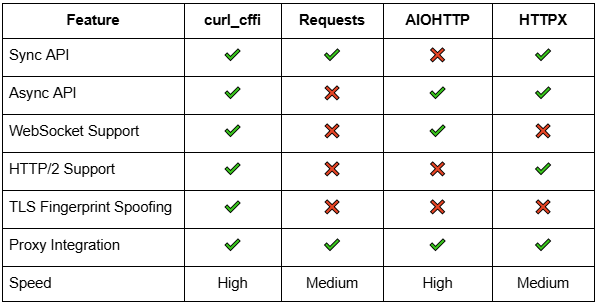 Порівняльна таблиця HTTP-клієнтів
Advantages of curl_cffi
- TLS Fingerprint Spoofing: На відміну від requests and AIOHTTP, curl_cffi can easily bypass bot detection based on TLS fingerprints.
- Faster Requests: curl_cffi is faster than requests and HTTPX, making it ideal for large scraping tasks.
Conclusion
So, you learned how to use curl_cffi for web scraping in Python. This library allows you to mimic real browser traffic, bypassing advanced anti-bot measures like TLS-фінгерпринтинг. You also saw how to integrate BeautifulSoup for HTML parsing, handle asynchronous requests, and manage sessions and proxies. Whether you’re a beginner or an advanced web scraper, curl_cffi offers a powerful and efficient solution for extracting data from websites.
Якщо вам потрібні розширеніші можливості або повністю керований сервіс вебскрапінгу, розгляньте інші варіанти, наприклад Scraping Browser або Web Scraper APIs. However, for most use cases, curl_cffi provides a simple, fast, and effective way to easily scrape websites.